

Frequently Asked Questions
(Q) How do I get a VAT Invoice for my SCALE iPad in-app subscription?
(A) VAT receipts and invoices for iOS In-App subscriptions are handled by Apple. If you need a VAT receipt for a SCALE subscription, please follow the instructions below:
- (1) Go to https://reportaproblem.apple.com/
- (2) Log in with your Apple ID. Make sure this is the one you used when purchasing your SCALE subscription.
- (3) At the top of the screen you'll see two tabs - click on the one that says "Invoices".
- (4) On the following screen you'll see all purchases you've made over the last 90 days, along with an Invoice button for each one.
- (5) Click on the Invoice button to view a VAT Invoice.
Please note: Fitzroy Systems does not have access to any Apple ID account or purchase details. We are unable to generate any invoice or receipt for App Store purchases.
(Q) Is there a trial version of the Windows version available?
(A) No, the SCALE iPad version has a two week free trial, but we do not have any immediate plans for a trial version of the SCALE Windows version.
(Q) Is there an Android or MacOS version coming soon?
(A) No, there is not sufficient demand at the current time for Fitzroy to launch either Android or MacOS versions, but please let us know if you are interested in either of these platforms.
(Q) I've heard from one of Fitzroy's competitors that SCALE is a DOS program, and that it will soon be obsolete?
(A) No, on both counts. All programs within the SCALE package have been 32-bit Windows "win32" executables since 2004. The complete system is fully tested and supported on 32-bit and 64-bit versions of Windows 10, Windows 8.1, Windows 8, and Windows 7, and 32-bit and 64-bit versions of iPadOS 13, iOS 12, iOS 11, iOS 10, and iOS 9.
SCALE proformas have always been based on a text based question and answer session, as this is the most efficient way for the user to enter the data required.
(Q) What's happened to SAND?
(A) Everything shown on this website, and everything that was in SAND is now included in the SCALE system.
SAND previously included everything on this website with the addition of non-linear analysis, SCALE now includes all the non-linear analysis.
As SCALE is the better recognised suite, and the suites only differed in their front screens, the decision was taken to unify the two for the release of SCALE Version 5.
(Q) When will you update the proformas to the new Eurocodes?
(A) All the SCALE proformas have now been modified such that each proforma will allow design to the previous British Standard showing full workings displayed to the British Standard, or design to the new Eurocode with full working displayed to the Eurocode.
(Q) If I buy a new computer with 64-bit Windows 10, will Scale run?
(A) As all programs within the Sand and Scale packages are 32-bit executables, they will run happily on the 32-bit and 64-bit versions of Windows 10, Windows 8.1, Windows 8 and Windows 7 operating systems, see screenshots of SCALE on 64-bit Windows.
(Q) If I buy a new computer with a dual-core, quad-core, octo-core processor etc., will Scale run?
(A) All programs within the Sand and Scale packages are "thread-safe" and will run without problems regardless of the number of processors present. The newer the machine, the faster the software will run.
(Q) When I print to Adobe Acrobat PDF Printer, I get pages of gobbledegook appearing.
(A) Sometimes Acrobat will be set to substitute the fonts for the Scale document with its own, and this can lead to gobbledegook. This setting is straightforward to reset manually, please follow the examples below for Acrobat 9 on Windows 7, and Acrobat 6 on Windows XP, other versions of Acrobat and Windows are similar. (It is not possible for Scale to reset this programmatically or via the registry as Adobe store this setting in the private portion of the DEVMODE structure)
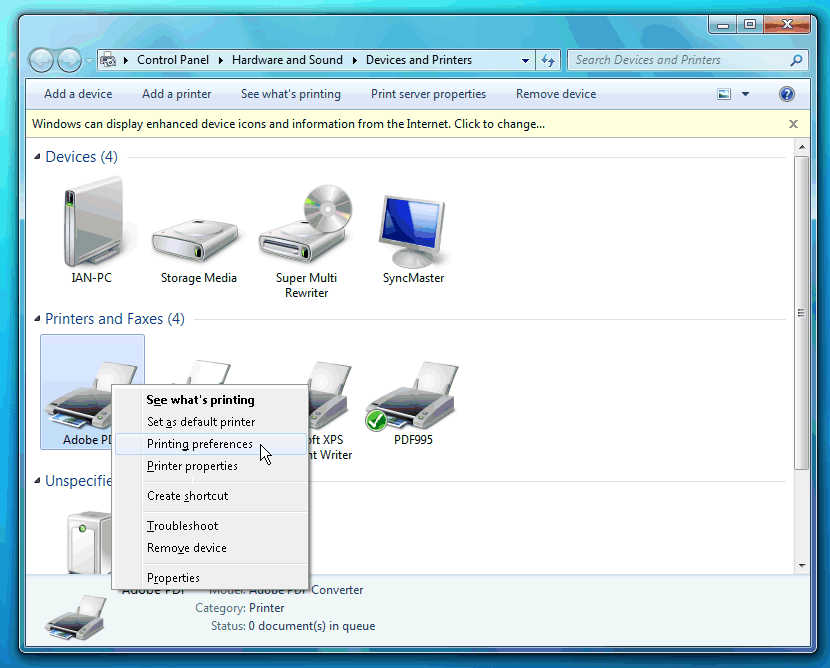
In Windows 7, click on the Start button, then click on "Devices and Printers". In the "Devices and Printers" window, right click on the "Adobe PDF" printer icon, then click on "Printing Preferences"
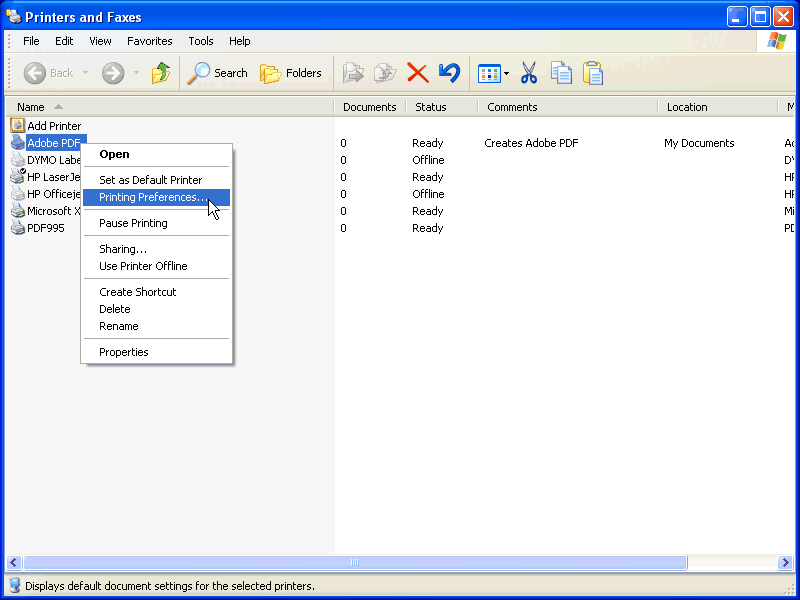
In WIndows XP, click on the Start Button, then click on "Control Panel". In "Control Panel", double click on "Printers and Faxes". In the "Printers and Faxes" window, right click on the "Adobe PDF" printer, then click on "Printing Preferences..."
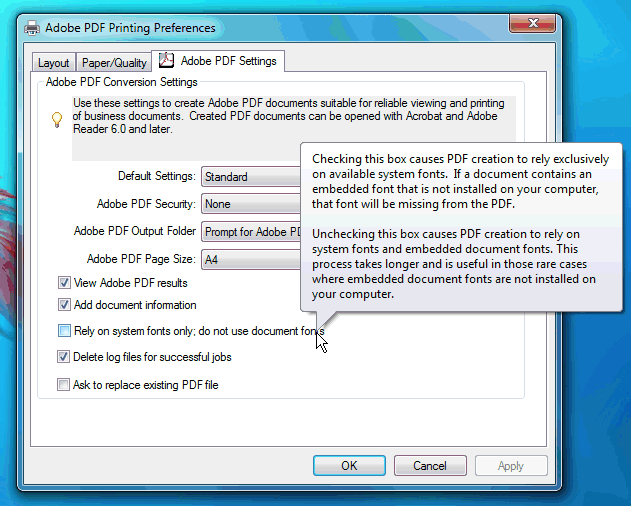
For Acrobat 9, in the "Adobe PDF Printing Preferences" window, go to the "Adobe PDF Settings" tab, then untick the box for "Rely on system fonts only; do not use document fonts"
For Acrobat 6, in the "Adobe PDF Printing Preferences" window, go to the "Adobe PDF Settings" tab, then untick the box for "Do not send fonts to "Adobe PDF""
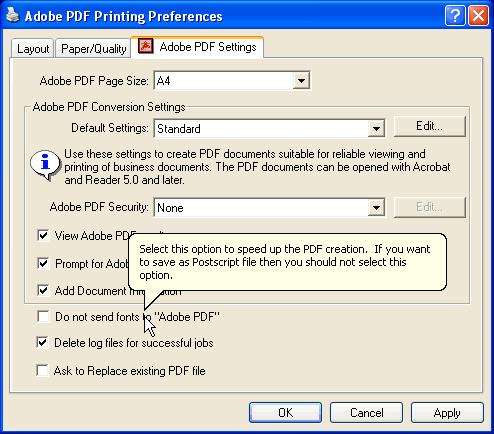
Finally, click on "OK" to close the open dialog windows.